Shot Clock by Dugong Technology

Shot Clock Diary

Know whether you're actually getting better.

Everyone remembers the good days. A season's worth of scores remembers all of them — and shows you the patterns you'd never spot from memory.

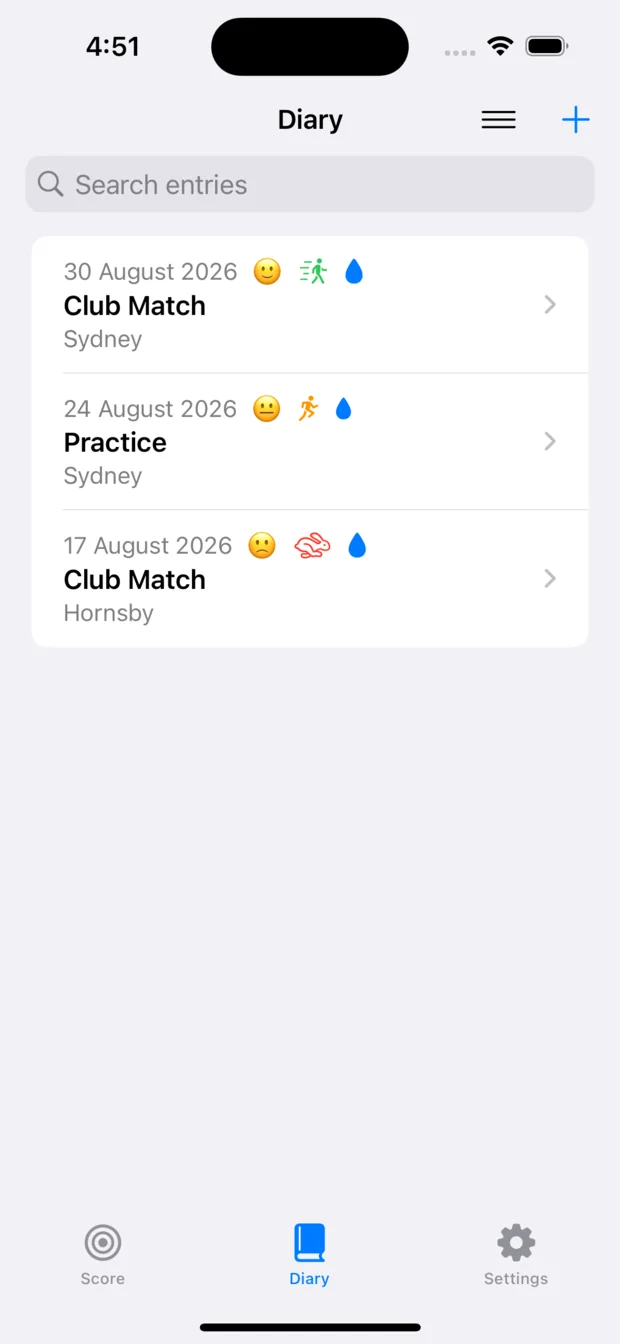
The Diary list on an iPhone, showing three sessions with their dates, locations and mood, energy and hydration markers.
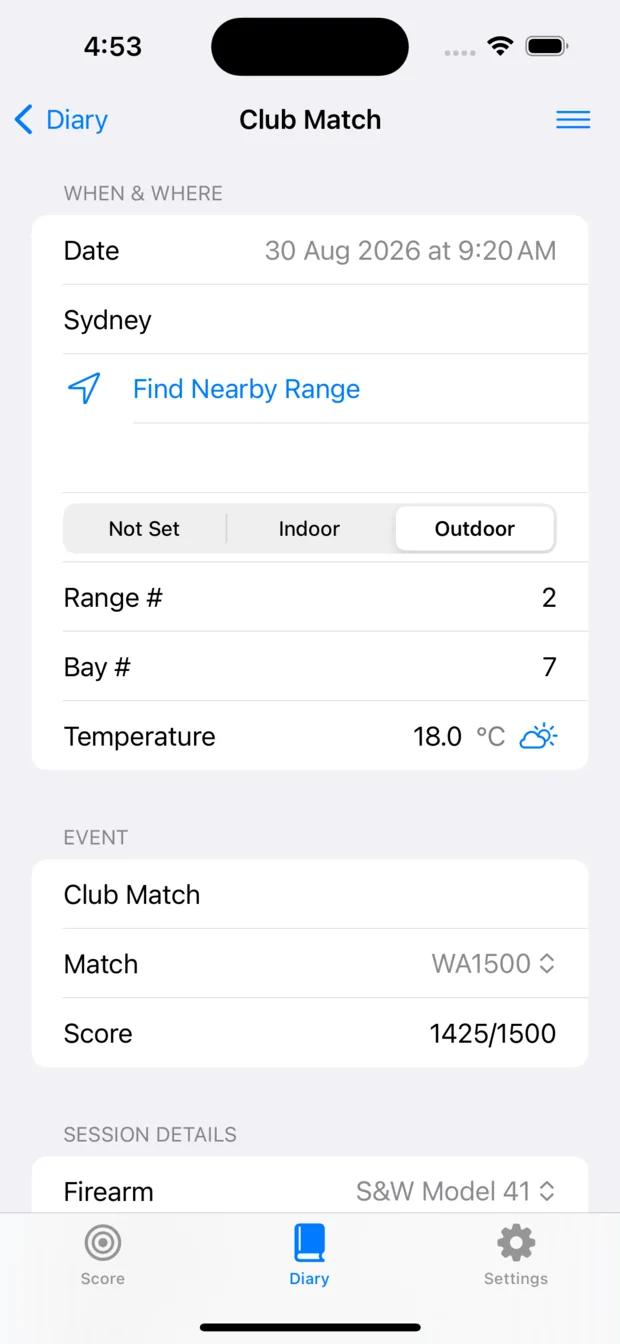
A single Diary entry on an iPhone, showing date, location, range and bay, temperature, event, match, score and firearm.

No account. Your data stays on your device.

There's no Shot Clock account to create. Purchases are handled by the App Store or Google Play, and your matches, stages, score cards, notes and media stay on your device. It works at the range with no reception and no internet connection at all — exactly as it does at home.

What goes into an entry

A shooting diary, not a notes app.

An entry holds the things you'd actually want back in six months — what you shot, what the conditions were, and what it looked like.

The conditions, filled in for you

Give it the time and the place and it fetches the weather for the hours either side: temperature, cloud cover, precipitation, wind and humidity. Not a single reading — the whole session, charted.

Photographs and video

The target, the group, your position, the gear you were running. Whatever you'll want to look at again.

Draw straight on a photo

Mark up a target face or a group with a finger or a pencil. The drawing sits over the photo rather than in it — one tap hides it, and the original is still underneath, untouched.

Blank canvases to sketch on

Add as many as you need. Draw an IPSC stage layout, a wind call, a position, a plan — the things a photograph can't show you.

The card that goes with it

Link the score card you shot that day to the entry, so the numbers and the notes about them stay together.

All of it, as one PDF

Export the entry — notes, conditions, charts, photos and sketches — as a single document, and send it with your phone's own share sheet. Your coach, your squad, your files, anywhere you'd send anything else.

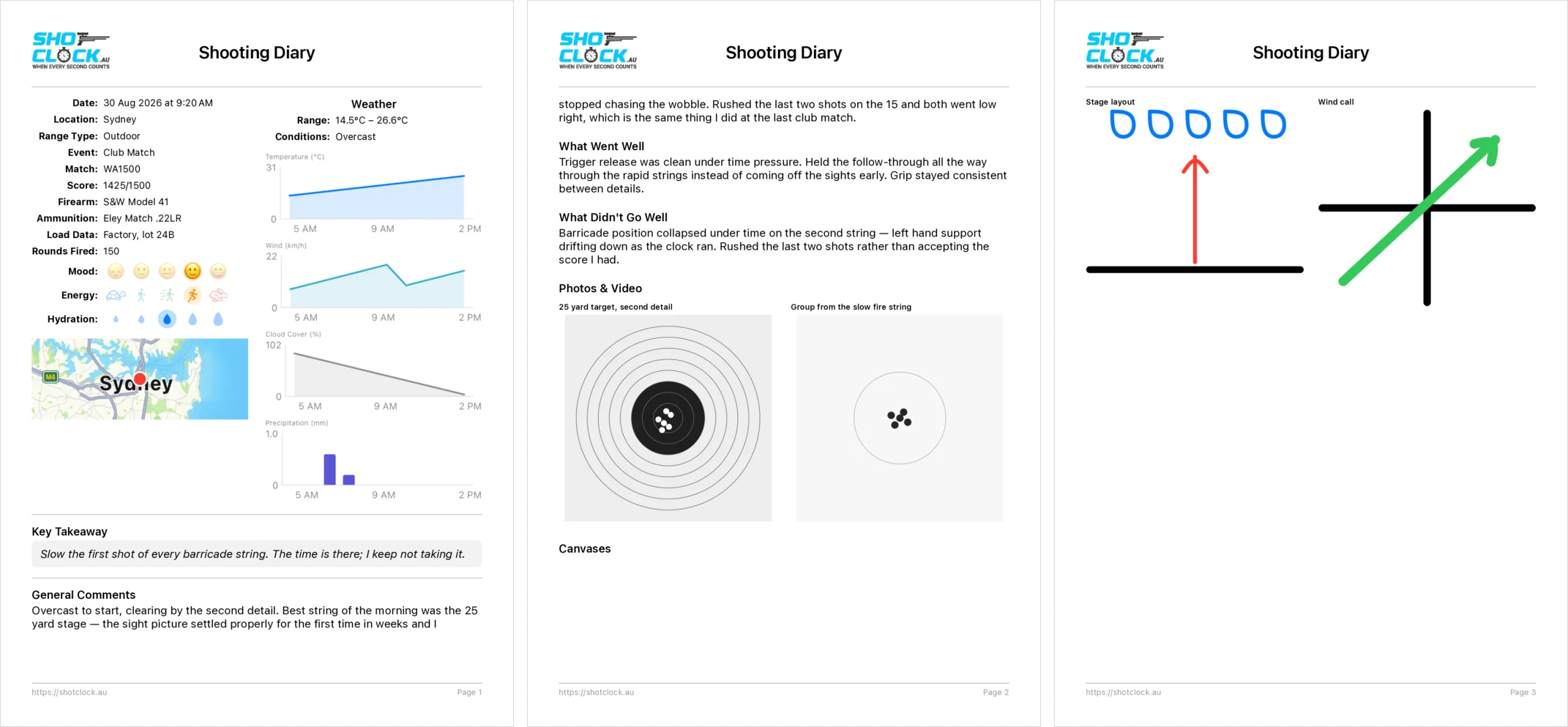
Three pages of an exported Diary PDF: the session's fields with weather charts and a location map; the written notes with photographs of the target and the group; and the drawing canvases showing a sketched stage layout and a wind call.
One session, exported — fields, conditions, photographs and sketches, over as many pages as it takes.

Scoring

The card your match actually uses.

Every match Shot Clock times has a score sheet to go with it — laid out the way the paper card is. And if your club shoots something that isn't in there, you can draw it yourself.

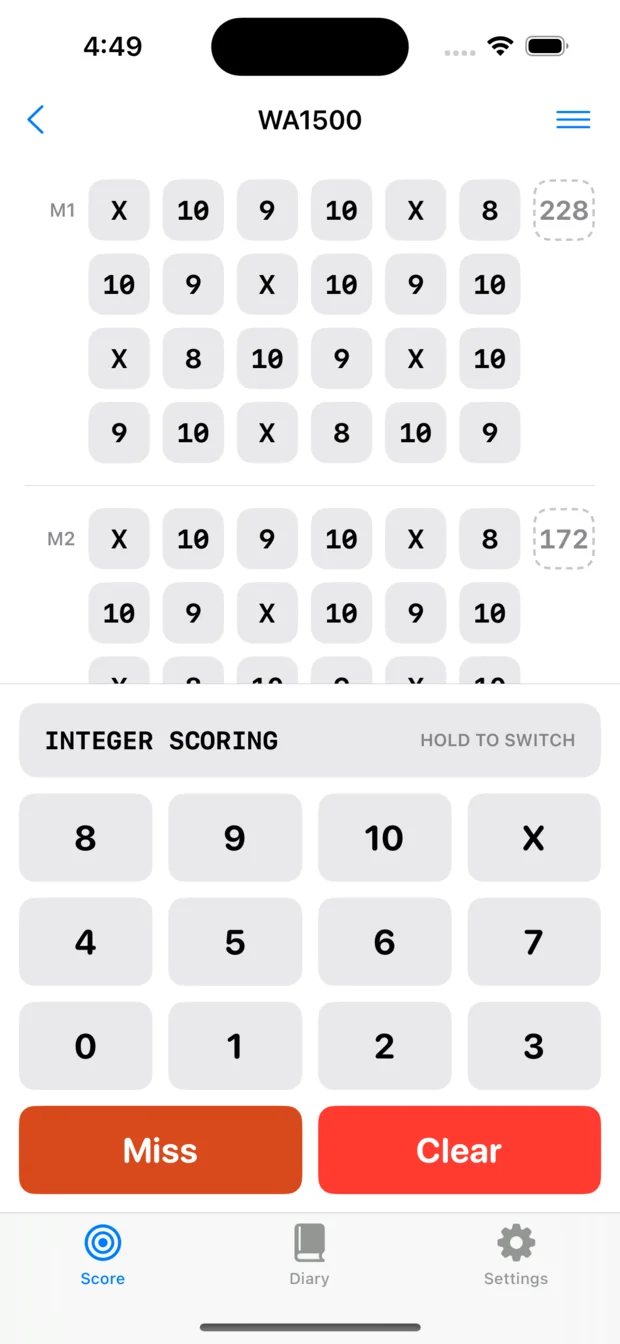
A WA1500 score card part way through on an iPhone, with the purpose-built score keyboard docked beneath it: Integer Scoring, keys for the rings and X, and Miss and Clear.

A keyboard made of scores

Not the phone's keypad with a decimal point to hunt for. The keys are the scores — the rings, an X, and a miss — and it stays docked under the card instead of sliding in and out of the way. Entering a string is one tap a shot, without looking.

Hold the badge to switch between whole rings and decimal scoring.

On a tablet it becomes a panel in its own right: slide it anywhere from one side of the screen to the other, and pick one of three sizes. All of it so the keys land under the hand you've got free — a whole card entered with one finger, without shifting your grip.

Every match, already drawn

Score any of the matches built into Shot Clock. What you fill in on the phone is what you'd have filled in at the scorer's table.

Or build your own

Club match with a card of its own? Lay it out once, save it as a template, and it's waiting for you every time you shoot it.

Sighters and malfunctions

ISSF matches are handled properly — sighting shots kept out of the count, and makeup boxes that appear only once a malfunction has actually been declared.

Numbers you can act on

Where your shots are landing, for the whole card and for each stage in it. "My rapid fire is letting me down" stops being a feeling and becomes something you can point at.

A season, not a Saturday

Statistics across every match you've shot, not just today's. Good weeks and bad weeks turn into a line you can read.

Nothing overwritten by accident

Stop entering for a moment and everything already down locks itself. Empty boxes never lock, so scoring forward is never interrupted — and when you do need to correct something, a long press on the box opens it up again.

Out as a PDF

Export the finished card with its statistics and send it wherever you like, through your phone's own share sheet.

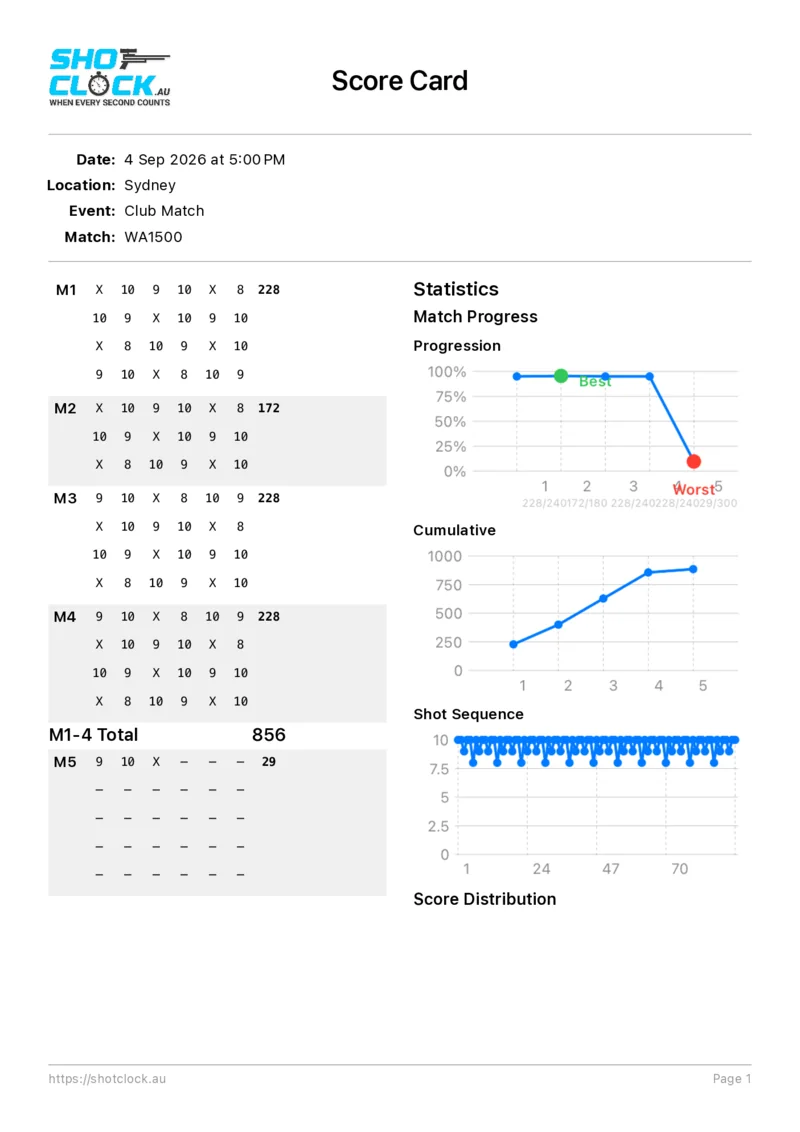
The exported score card PDF: the match's shots laid out by stage, with progression, cumulative and shot-sequence charts down the right-hand side.
The card as it comes out, with the statistics beside it.

Match Official Mode Optional in-app purchase

Score the whole line, not just your own card.

Add Match Official Mode and the app becomes a range officer's tool: up to fifty competitors on one phone, the section you're responsible for fenced off, and a PDF for the lot at the end of it.

Fifty cards, one phone

Score up to fifty competitors in the same match. Swipe sideways to move to the next one — everything you've entered is exactly where you left it.

Just your bays

Tell it which section you're on — bays 11 to 20, say — and that's all you can swipe through. Past 20 and you're back at 11, so you never land on somebody else's shooter mid-relay.

One PDF for everyone

Export the whole match as a single document: every competitor's card, with their own statistics alongside it.

Scores on the big screen

Send the running scores to a monitor so spectators and competitors can watch the standings move, live, without crowding the scorer's table. How Live Scores works →

The Match Report

In Match Official Mode the diary makes way for a match report — disruptions, penalties, disciplinary matters, and anything else that has to be on the record for the day.

Match Official Mode is an in-app purchase, on top of the app itself, and it is aimed at clubs rather than at individual shooters. It puts the tools in your officials' hands for every competitor on the range — not something each member needs to buy for themselves.

Live Scores · part of Match Official Mode

Everyone watches the standings move.

Score the match on your phone and the results appear, as you enter them, on a screen the whole range can see. The board is an ordinary web page, so anything with a browser can show it — a laptop on the table, a television on the wall, or a competitor's own phone.

Your phone stays in charge of the scores throughout — the display is showing what you've entered, not keeping its own copy of the truth.

There is nothing to log into: the board is an address. Hand it out and anyone can follow — competitors between details, or someone on the other side of the world watching a match they couldn't travel to. Nobody waits until the packing-up to find out where they came. Worth remembering the other way round, too: everyone you give it to can see it.

Live Scores comes with Match Official Mode. It's the same in-app purchase as the rest of it — there's nothing further to buy.

View a Live Demo
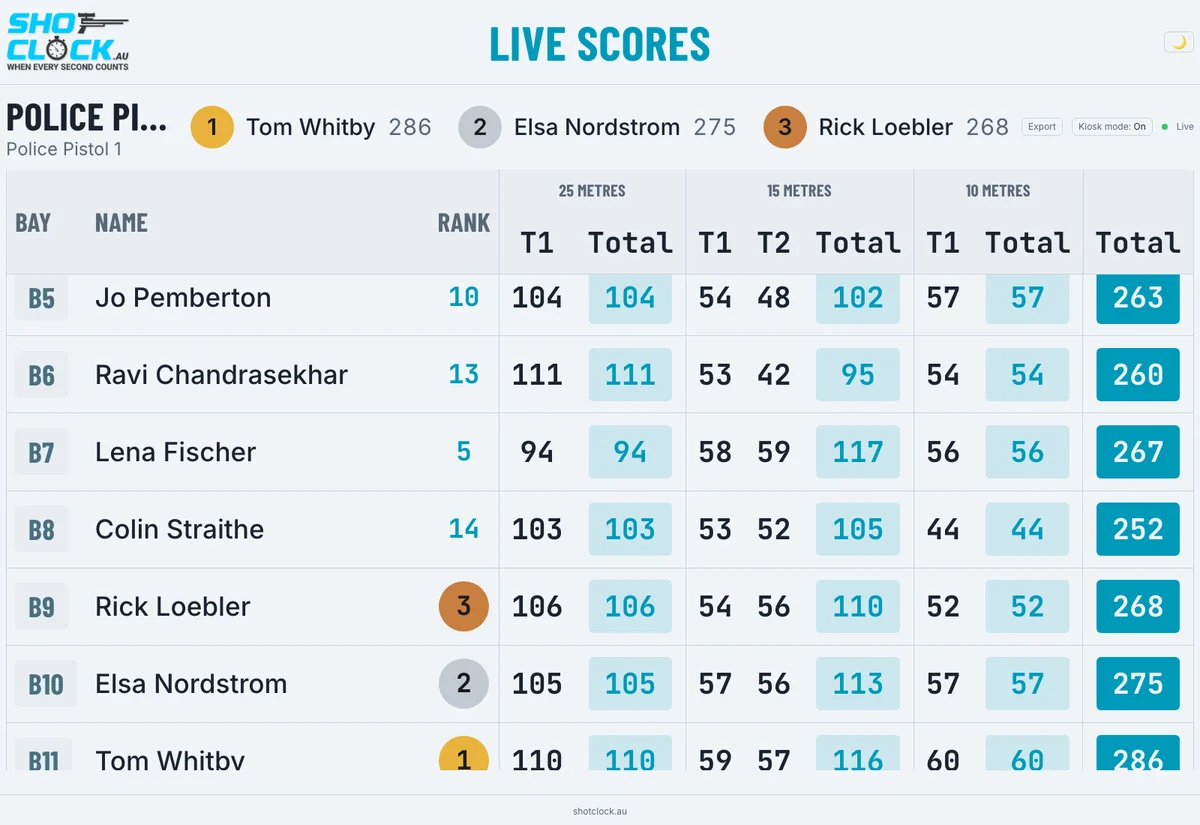
The Live Scores viewer open in a browser, showing a running scoreboard for a match.
The demo board is a real match running through the real scoreboard — the same page a club's screen would be showing.

More than one scorer, one board

One range officer can put the scores up alone. Two can share the board — someone on bays 1 to 10, someone on 11 to 20 — and the whole field is ranked together as a single match.

They don't have to be in the same place

Or the same club, or the same city, or the same country. Everyone scoring types in the same match name and the board merges what they send, each site labelled with where it's shooting.

Which makes a postal match live

Shoot the same course of fire on both sides of the Tasman and watch one ranked board as it happens, instead of posting cards away and waiting weeks. Agree a name, everyone types it in, and latecomers simply appear — about five minutes of setting up.

Several ranges, one screen

Standard Pistol on range 1, Rapid Fire on range 2, Air Pistol on range 3 — different matches, not one field split up. A club's own scoreboard cycles through them, giving each range the screen to itself for long enough to be read from across the room.

When the shooting stops, the paperwork is already done.

The board has every shot of the match in it. Three ways to take it away with you, whichever the day needs — and the same three however you're serving the board, from us or from your own bench.

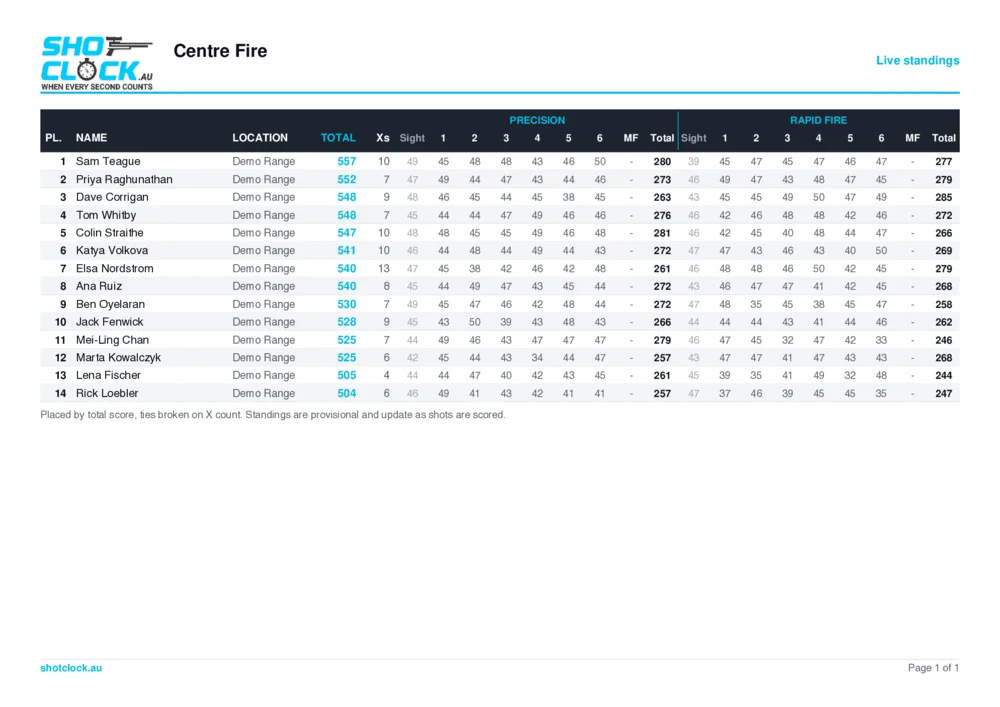
The exported Live Scores results sheet: fourteen competitors placed by total with X counts, and their scores broken out by stage across Precision and Rapid Fire.
The results sheet, placed by total and broken out by stage. This is the one that gets pinned up.

A sheet for the notice board

Ranked results, each competitor's scores grouped into their series. Print it and pin it up before anyone has finished packing the car.

A sheet for the official scorer

Every competitor, every shot, laid out one string to a row in the order scores are entered — so whoever keys the match into your association's system reads straight across the page instead of hunting up and down it.

A spreadsheet

The same match as a CSV: opens in Excel, pastes into whatever your club already keeps its records in. The one to reach for when a system is going to read it rather than a person.

In testing at ranges — not for sale yet

Or keep the whole thing on the range.

The Live Scores server is a small box that does on site what our server does online. The scores stay on it — local, private, and never leaving the range.

It joins the club's wireless network if there is one, in which case the scorers are covered wherever the club is. If there isn't a network — and at plenty of ranges there isn't — it makes its own for them to connect to, which reaches about as far as any hotspot does. Put it where the scoring happens rather than at the far end of the property.

It has an HDMI socket on the back, so it drives the television directly — no laptop in the middle, and nothing to set up on the morning beyond switching it on.

Everything else on this page works the same either way — same scoring, same merging, same page, whether the board is served from the range or from us. The server itself is still in development: see it in Shot Clock Labs.

Don't need the timer?

Shot Clock Diary is its own app. If you've already got a timer you're happy with and you only want the record-keeping and the scoring, this is the one to get — it doesn't include the timer, and it costs less because of it.